
Active Directory Lab Setup
Setting up a Windows Server 2025 Active Directory Lab on Proxmox, including VLAN configuration and guest agents.
I installed Windows Server 2025 on my Home Server. Since Proxmox (the base operating system my server is running) uses QEMU, I decided to briefly use Microsoft’s DISM (Deployment Image Servicing and Management) to preload VirtIO drivers.
My server has a consumer motherboard and therefore 1 ethernet port; I needed to log into my router and add a VLAN. The VLAN tag was set to 9 and also included my router’s guest Wifi network. This allowed me to connect laptops to that network, and the DHCP server knew to send those to my newly created subnet.
By default, my home network is set to not allow communication between guest and default subnets, so I decided against using RDP when connected to the Windows Server from my Desktop.
So after installing Windows Server, I grabbed:
QEMU guest agent (for graceful shutdowns and snapshots)
Spice Guest Agent (changing resolution, copy/paste, more performant than noVNC)

An overview of the network topology and server architecture.
Network Configuration (OpenWrt/LuCI) My router (GL.iNet AX1800) handles my main home traffic on the 192.168.8.x subnet. I didn’t want to disrupt that, so I had to figure out how to run a second, isolated network simultaneously.
Using the router’s advanced LuCI interface, I created a new Interface specifically for VLAN 9 without touching the main LAN settings. This created a “Dual-Subnet” environment:
Home: 192.168.8.x (DHCP handled by the Router)
Corp Lab: 192.168.9.x (DHCP handled by Windows Server)
Domain Setup and The DHCP Conflict With the networking path clear, I set a static IP for the server (192.168.9.100) and installed the Active Directory Domain Services role, promoting the server to a Domain Controller for tisdial.local.
Next, I installed the DHCP role so the server could manage IPs for the lab network. This is where I hit a wall. The service refused to run, filling the logs with errors.
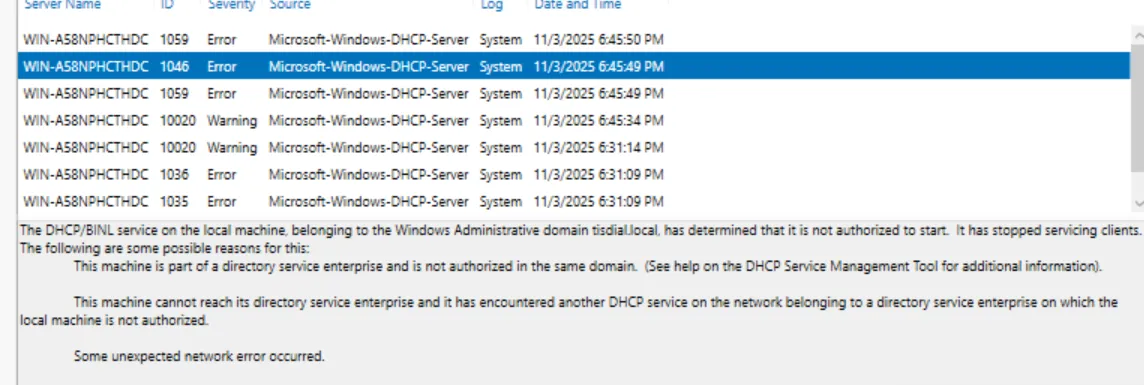 Windows Event Viewer showing “Not Authorized” errors (Event ID 1046).
I learned that in a Domain environment, the DC blocks rogue DHCP servers for security. I had to right-click the server in the DHCP console and manually “Authorize” it. Once I did that, it started handing out IPs to the guest network immediately.
Connecting the Clients I grabbed two old laptops, wiped them, and installed Windows 10 Pro (Home edition doesn’t support Domain Joining). I connected them to the Guest WiFi (VLAN 9) and changed their settings from “Workgroup” to Domain tisdial.local.
After authenticating with my admin credentials, the laptops joined successfully. To confirm the networking topology was working—meaning the laptop was routing through the VLAN but getting instructions from the Server—I checked the connection details.
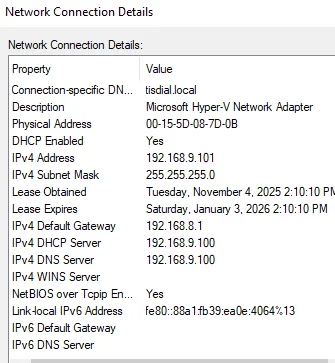 Success. The client (192.168.9.101) is on the correct subnet and using the Server (192.168.9.100) for DNS and DHCP.
Hiccups Along the Way It wasn’t all smooth sailing. Here are a few things that tripped me up:
Remote Desktop Rejected: I tried to RDP into the server using a standard user account I created (“John Doe”) to test permissions. Windows blocked it immediately.
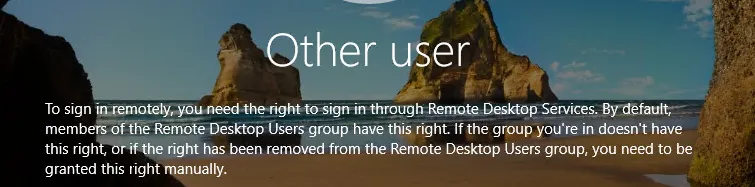
Fix: By default, only Admins can RDP. I had to add the user to the “Remote Desktop Users” group in Active Directory.
Firewall Lockout: Because I isolated VLAN 9, the Server couldn’t access the Proxmox web UI to grab ISOs. I had to temporarily open a firewall rule in the router to transfer files, then lock it back down.
Time Sync Issues: One laptop refused to join the domain. It turned out its system clock was 15 minutes off. Active Directory uses Kerberos, which requires time synchronization to prevent replay attacks.
Questions I Had Can I really have two DHCP servers on one router? Yes, as long as they are on different subnets. My router manages the 8.x subnet, and my Server manages the 9.x subnet. They don’t interact, so there are no conflicts.
Can I use WiFi for the Server? Technically yes, but I avoided it. You don’t want a Domain Controller dropping packets because of interference. VirtIO ethernet is much more stable.
Why do I need a Domain Controller? Scalability. If I want to change a password policy or map a drive for 50 computers, I do it once in Group Policy rather than touching 50 individual machines.