Proxmox Homelab Build
My journey transitioning a gaming rig into a Proxmox homelab, the mistakes I made, and the final stable environment.
I recently transitioned my home server to a Proxmox VE environment - stepping out of the cozy docker-filled corner of most NAS OS’s.
My goal was to move away from simple application installation and toward managing a true virtualization environment. I initially tried Unraid and TrueNAS, but I kept hitting walls. They felt too rigid. I wanted the flexibility to spin up LXC containers, Docker instances, and full QEMU VMs side-by-side without fighting the OS.
So, I wiped the drives and installed Proxmox. Here is the story of the build, the things I broke, and the stable environment I eventually managed to build.
The Camouflaged Server
My fiancé wouldn’t appreciate an enterprise rack server that sounds like a jet engine. I built this on “standard” hardware. A repurposed gaming rig tucked away in a generic black case, camouflaged in the corner of my office.
| Component | Model/Spec | Role | Notes |
|---|---|---|---|
| Compute | Intel Core i7-8700k | Primary CPU | 6 Cores / 12 Threads |
| Memory | 16GB DDR4 | RAM | The current bottleneck (more on this later) |
| GPU | Nvidia GTX 970 | AI Accelerator | Passed through to Immich for facial recognition |
| Boot Drive | Samsung 500GB NVMe | OS & ISOs | Fast storage for templates and the host OS |
| Bulk Storage | 4x 1TB HDD (RAIDZ1) | Data Pool | ~3TB Usable for Nextcloud/Media |
| Chassis | Generic Black Box | Case | Stealth build; high WAF (Wife Approval Factor) |
The Network Topology
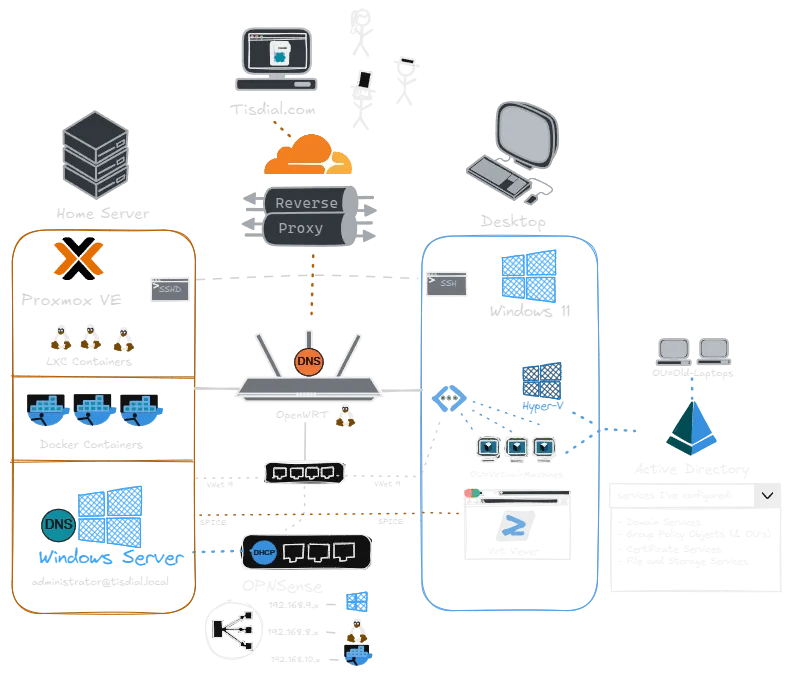
An overview of the network topology and server architecture.
The Struggle: Why I Nuked It and Started Over
My early attempts were a mess of permission errors and connectivity black holes. I struggled to wrap my head around mounting container storage in a way that allowed for cross-container talk. Sort of defeating the purpose, but ultimately getting the apps to see the data they needed. And without going too much into detail… I truly understand the saying:
"IT'S ALWAYS DNS"Eventually, I realized I had dug myself into a hole. I did the only reasonable thing: I nuked it and started over.
The second time around, I leaned heavily on the Proxmox VE Helper-Scripts. After creating my own templates, based on these installation scripts, things were a breeze. Specifically for complex apps like Nextcloud; removing the need to manually configure the Nginx reverse proxy or the database backend from scratch.
The Service Stack
I currently host over 20 services, here are just a few of them…
Core Infrastructure (VMs)
- Home Assistant OS (HAOS): The central brain for my IoT devices.
- OpenWrt: I run two instances (production and lab) for network segmentation.
- Windows Server 2025: A virtualized instance of Microsoft’s latest server OS. It’s new, shiny, and serves as my sandbox for Active Directory learning.
Productivity & AI (LXC)
- Immich: This is where that GTX 970 shines. It handles photo backup and AI asset management.
- Nextcloud: The “Google Drive killer” for self-hosted files.
- Paperless-ngx: For OCR-ing and archiving physical documents.
- Ollama: Running local LLMs on my own hardware.
- Dashy: My “Start Page.” I use this for quick navigation to all services, while keeping the Proxmox WebUI open on a second monitor for system health.
Continuing Operations: Staying Alive
The most painful lesson of this migration was the forced restart. To ensure that never happens again, I’ve established a strict maintenance routine:
- The “Sunday Update”: I don’t auto-update. Every Sunday, I sit down, review pending updates, and apply them manually. This keeps me in the loop on what’s changing.
- The Backup Strategy: I use the Google Drive API with
rsyncto push critical data offsite. If, God forbid, 2 drive failures happen simultaneously, my data will survive. - Monitoring: While Dashy gives me access, I rely on the Proxmox WebUI to watch resource usage—specifically that RAM usage, which is constantly hovering near the limit.
Future Plans: Breaking the RAM Limit
Right now, my biggest limitation is the 16GB of RAM.
I want to use Windows Server 2025 to simulate a full corporate environment—Domain Controller, clients, policies, the works. Currently, I have to boot up old laptops physically to act as “clients” because my server doesn’t have the memory to run the Windows VMs I need.
If I win the lottery, the next upgrade is doubling (or quadrupling) that RAM. Once I do that, those old laptops can finally retire, and the sad, but quiet black box in the corner will truly run the show.